Report Builder 2.0 Released


Microsoft SQL Server 2008 Reporting Services Report Builder 2.0 (bit of a mouthful isn’t it?) has now been released and is available for download here.

Overview

Microsoft SQL Server 2008 Reporting Services Report Builder 2.0 delivers an intuitive, Office-like report authoring environment enabling business and power users to leverage their experience with Microsoft Office 2007 products. Microsoft SQL Server 2008 Reporting Services Report Builder 2.0 supports the full capabilities of SQL Server 2008 Reporting Services including:

  • Flexible report layout capabilities of SQL Server 2008 Report Definition Language
  • Data Visualizations including charts and gauges
  • Richly formatted textboxes
  • Export to Microsoft Office Word format

Features specific to Report Builder 2.0 are focused on simplifying the process of creating and editing reports and queries and include the following:

  • Easy to use wizards for creating table, matrix and chart data regions
  • Support for directly opening and editing reports stored on the report server
  • Support for using server resources such as shared data sources
  • Query designers for multiple data sources including a Microsoft SQL Server-specific query designer

ReportBuilder

Note; The title says SQL 2008 and is misleading, as you can use this to target SQL 2000, 2005 and a whole host of other databases like Oracle and Microsoft Access.

The Death of Windows Forms – Part 2


In a previous post, I was deliberating about whether to elect windows forms or WPF for an application I was writing. In the end I chose to use the products from Component Factory. The proprietor of said company (Philip Wright) has recently elected to construct a disquisition into WPF adoption. I have chosen to go a little further into reasons Philip states as problematical.

WPF Tooling

I agree whole-heartedly with Phil, it is immediately perspicacious upon opening up the Visual Studio 2008 toolbox, that the controls available are like “Old Mother Hubbard going to the cupboard and finding that it was bare”. Tim Sneath, a Group Program Manager for WPF has a comprehensive listing into the latest improvements in the WPF space, and you can see that controls are still the last thing being considered, as performance and graphics have been the priority.

The best example of WPF tooling is WPF/E, better known as Silverlight. The first release candidate is now available but why is this significant? The significance lies in the fact that Silverlight is a cut down version of WPF, and it is only now that it is beginning to reach completion. If a cut down 4MB version of something that is currently about 80MB (WPF assemblies) is only just nearing completion, you can safely assume that it will be some time before “completion” is reached for the far larger WPF libraries. That is the prime indicator of the work still left with WPF.

I must however disagree a bit with Phil on a minute point. Resource Dictionaries make it a breeze to skin or template all the controls in your application, so as more and more controls become available, then it is very easy to affect your complete applications look with literally a “switch”. The issue with WPF, is new types of controls. At present most vendors are recreating controls already available in windows forms, and augmenting them with WPF. Until the WPF toolbox reaches parity with Windows forms and new types of controls start to be created with WPF that are unachievable in windows forms, then WPF will be seen as playing catch-up.

WPF Applications

This is such an important point. I have lengthy but related posts here and here. Microsoft have always been in the Operating System and Server business, and relied on third parties to produce the eye-candy. The lack of applications is directly linked to why Vista (A WFP bedrock) has been received so poorly. As I’ve said in the links above, the same 100% of applications I used on XP, are the same 100% I use on Vista.

Probably the most widely talked about WPF application is the Lawson Mango application. It is important that my following remarks are not misconstrued so I must clarify that I would love to have worked on such an application.

The prime evocation to take from this application is that it is beyond beauty, and present applications do not compare one iota. This is a huge application, with the form count being around 10 000. It is very clear then that this was

  1. A money no object commission
  2. Technology and not business need driven (or mostly technology and a bit of business need)

For the average business application, resolving business need is the prime requirement. I am developing a Scheduling and BI application for a company, and the quite frankly, they couldn’t care less whether it was Windows Forms or WPF. Their prime requirements are

  1. Can you bring this project in under budget?
  2. Does it solve the business requirement?

One of the key factors that determines a software projects failure or success, is going over budget, and or not solving the business requirement. WPF is positioned disadvantageously here, because it is really very expensive at present to develop applications with the technology. If you get an accountant to do your requirements gathering and costing for a new or existing application, you will be shocked at how much more it costs to develop a WPF application, for no return on investment.

Another key factor in launching a business application is how easy it is to learn. An application that looks like Office 2007, will be far easier to train staff to use because the user interface is familiar hence intuitive. When you take the Lawson Mango application, and look at a company with 500 people and consider the ongoing training costs, then your budget for training goes into the many thousands, where with an Office user interface, that will be significantly reduced. Some might say this is boring, and you will always be stuck in the past, but to run a business you always have to look at the skills your current workforce have, and the return on investment that a specific technology will give you. It is for these reasons, that your typical business will prefer the Office 2007 UI in windows forms, to the Lawson Mango.

Supply Side Push

WPF will only gain popularity and mainstream recognition when Microsoft themselves release a WPF product. Obviously Windows 7 should contain more WPF applications and that will be a key factor in WPF adoption. What they need is a new Media Player done in WPF, or an application that is ubiquitously used in the operating system written “top down” in WPF. They also need to create managed wrappers available for both Windows Forms and WPF for the OS, unlike Vista at present.

Windows forms has already proven that it can create a good 60% to 80% of what is achievable in WPF, but as anyone that has ever developed a project of a decent size will tell you, writing software is very expensive, and unless WPF can start to negate the expense associated with it, for reasons aforementioned, it will continue to have a tardigrade uptake.

Not downloading .pdb files when debugging .NET


A quick tip is to cache your .pdb files onto your local machine when debugging .NET. This means that each time you debug the source then you don’t suffer the performance hit of downloading all the files again.

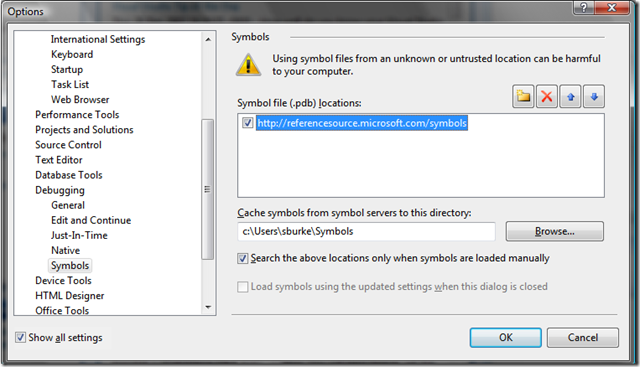
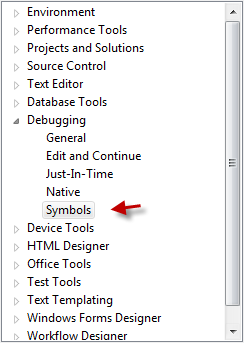
In Visual Studio go to Tools->Options and navigate to Symbols.

SymboleTools

Make sure you deselect the option to search the above locations and cache the files. In the example I have created a folder on my c:\ drive called RSCC where the files are saved.

Symbols

Switch off/on Visual Studio 2008 Background Compilation


A new feature in the Visual Studio 2008 service pack 1, is background compilation of code to check for errors as it’s written. This facility has existed in Visual Basic for some time now, though I doubt it was ever this fast. What you get in the IDE is a red squiggle (similar to a spell check error) notifying the programmer a mistake is made. In this example I am mistakenly trying to assign a string value to an integer.

ErrorMessage

This type of error checking is all-over-the-place and saves one significant amounts of time, principally because errors are corrected sooner, meaning one doesn’t compile a project and then find loads of errors. I have a huge project, that I feel is being slowed down by this, and need to check whether the background compilation is affecting "snappiness" of the IDE.

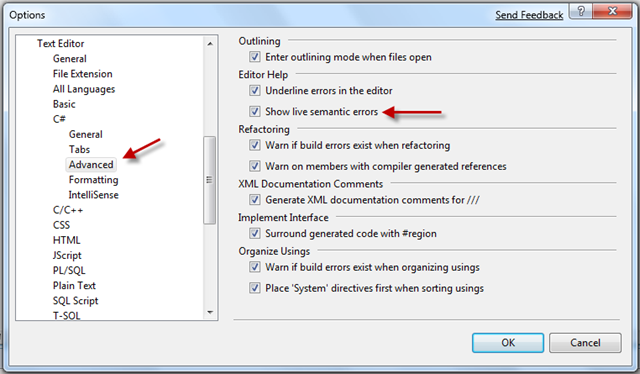
To do this (In Visual Studio) go to Tools and then Options.

In the Options dialog select the Text Editor node, then C# and go the the Advanced node. Remove the check in "Show live semantic errors" to disable background compilation, or conversely check it to enable the feature.

SemanticErrors

I would be interested to know if other users are experiencing a sluggish IDE – especially in the larger projects. It therefore "appears" that for larger projects, the time you save in fixing silly errors, is lost in IDE speed – disproportionate of course – but further testing is required.

Disabling windows themes for controls


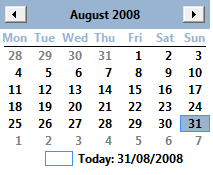
In this short example I demonstrated how you could improve the default theme of tree and listview controls to incorporate the Vista ‘look and feel’. It is also useful to disable this for example, you may want to remove the look of the month calendar (shown) or date timer picker controls. In Vista both controls are drawn with this styling.

CalendarEnabled 

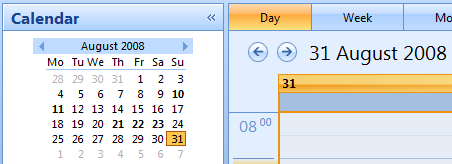
In office type applications you might prefer a control that has the same theme as the rest of the application, for example, this is my outlook calendar.

Outlook

In order to get the native calendar you need to follow the example but set the windows theme to empty strings (everything else is the same).

C#

SetWindowTheme(monthCalendar1.Handle, string.Empty, string.Empty); 

VB

SetWindowTheme(monthCalendar1.Handle, String.Empty, String.Empty)

You will now have the default control, that you can override and change.

CalendarDisabled

Vista Treeview and Listview


Update: Please note I have an update to this post available here.

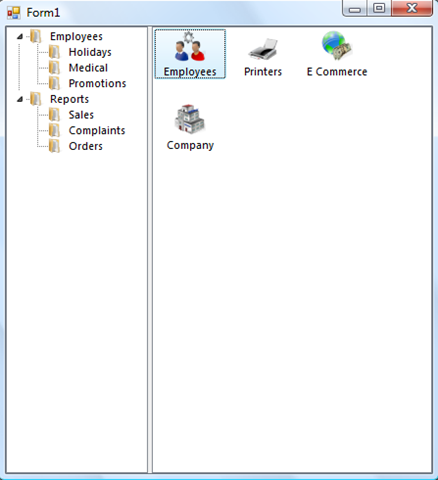
Standard windows forms tree and listview controls look rather dated on Vista, with a blue background to indicate a selected node or item

before

It is very easy to update both these controls to have the vista look and feel with three lines of code by calling the SetWindowsTheme method. This is ignored on XP so adding this code will not affect the same application running on XP.

after

C#

using System;

using System.Runtime.InteropServices;

using System.Windows.Forms;

namespace VistaTheme

{

public partial class Form1 : Form

{

public Form1()

{

InitializeComponent();

SetWindowTheme(treeView1.Handle, “explorer”, null);

SetWindowTheme(listView1.Handle, “explorer”, null);

}

[DllImport(“uxtheme.dll”, CharSet = CharSet.Unicode, ExactSpelling = true)]

private static extern int SetWindowTheme(IntPtr hWnd, string appName, string partList);

private void Form1_Load(object sender, EventArgs e)

{

treeView1.ExpandAll();

}

}

}

Visual Basic

Imports System.Runtime.InteropServices

Public Class Form1

<DllImport(“uxtheme.dll”, CharSet:=CharSet.Unicode, ExactSpelling:=True)> _

Private Shared Function SetWindowTheme(ByVal hWnd As IntPtr, ByVal appName As String, ByVal partList As String) As Integer

End Function

Private Sub Form1_Load(ByVal sender As System.Object, ByVal e As System.EventArgs) Handles MyBase.Load

SetWindowTheme(treeView1.Handle, “explorer”, Nothing)

SetWindowTheme(listView1.Handle, “explorer”, Nothing)

treeView1.ExpandAll()

End Sub

End Class

Cannot debug .NET framework source in Visual Studio 2008 SP1


Update 21 July 2009

All of a sudden, traffic to this post in my blog has leapt up again, so I was curious as to why so? If you are running Windows Vista, and have upgraded to SP2, then debugging the .NET source no longer works, full update in this post (jump to today’s date of course).

Update 4 September 2008

The .NET 3.5 SP1 source code has now been made available. The best place to subscribe henceforth and forthwith is the new Reference Source Code Center.

They have also changed the way that symbols are loaded, a tutorial is available here.
Update 20 August 2008 (Original article beneath)

I have just received an Email back from Shawn Burke. This was the question I put to him;

Hello Shawn,

I would like to know if you have any concrete plans for a .NET 3.5 SP1 release that allows us reference to this new update?

Warmest regards,

Ira

And this was his response

Hi Ira –

It’s being worked on, hopefully by the end of the week.

Thanks,

Shawn

Original Article

After wasting an hour or so I have bumped into an annoying limitation of the new Visual Studio.NET 2008 Service Pack 1. When one attempts to load the Symbols you get a messagebox dialogue saying "There is no source code available for the current location"

ErrorMessage

The reason why is because Microsoft have not posted the correct .pdb files for the .NET 3.5 SP1 release. Don’t waste your time trying to install the Visual Studio QFE which was required when the initial .NET source was released as this does not work – as I’ve just found out. The only place to get information has been Shawn Burke’s blog, but he appears to have turned off comments after someone identified this anomaly. I certainly hope the source will be available soon, because I really needed it today. I will probably install .NET 3.5 on a virtual machine and access the code I need to that way.

There have been some changes to the debugging options like the flat check boxes. This is prior to SP1

oldone1

This is after

flat1

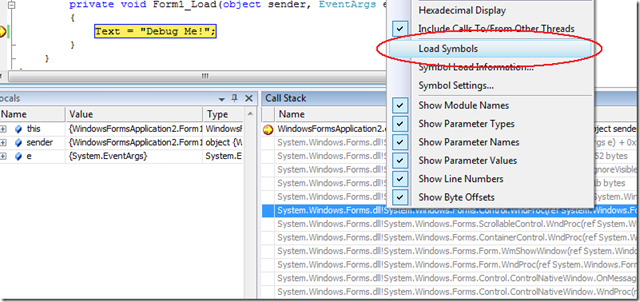
Additional options have been added to the Symbols menu, again this is prior to SP1

oldtwo1

And this is post SP1

options1

The above changes are reflected in the context menu that you use to debug, before

image-thumb-51

Now

changes1

All in all some small, but useful enhancements to improve the debugging experience. I do hope the new .pdb files are released soon.

The ADO.NET Entity Framework, REST and SOAP


As an n-tier developer, specialising in enterprise architecture, web services are central in determining how data is transferred between application and data store. It came as a painful shock to many, trying to implement Linq in n-tier scenarios, why they found such difficulty. The principal problem in Linq is that the “datacontext” object must always be connected to the database. Once the connection is broken, then change tracking (or state) is lost. For people coming from an ADO.NET disconnected dataset background, it seemed mysterious and a step backwards. I was one of those people, and ended up returning back to disconnected datasets, principally because the infrastructure was so mature, even though there are pain points. On the other hand, the ADO.NET Entity Framework has the distinct advantage over datasets, in that it is usable across all data providers i.e. Oracle, MySQL etc. whereas datasets are strictly a .NET shop. Datasets are still my data access layer object of choice for Smart Client focused applications, with the ADO.NET Entity Framework better suited to the Web.

The ADO.NET Entity Framework is a new layer in ADO.NET, recently released in Visual Studio 2008 and .NET 3.5 service pack 1. This in some ways overlaps with Linq, because it again is an Object Relational Mapping (ORM), but this is really heavyweight – it does more, and then some. Central to its architecture, is Representational State Transfer (REST). Aside from the cool acronym, what is it that REST offers that SOAP does not?

Within a software architect’s remit, is the task to never be technologically obsequious, and choose the correct technology to solve a specific problem. So which is better?

REST is a lightweight HTTP based stack, SOAP on the other hand is XML and rather heavyweight. Neither is better than the other. Bob Familiar and Ron Jacobs have an excellent video to disambiguate the two.

endpoint.tv – SOAP and REST a Perspective

The .NET Framework Client Profile


In a previous post, I discussed the benefits of the .NET Client Profile, but this was still beta and had not been released (though it has now been released in Visual Studio 2008 SP1).

Presently, this is only of benefit to XP machines, but its function will certainly be beneficial to Vista or future Windows versions, as the .NET versions increase. Essentially, all the server or developer specific libraries are removed, leaving application specific libraries only (why was this not thought of sooner?). If one is thinking of deploying a .NET 3.5 SP1 application today on XP, an installation of .NET 2.0, 3.0., 3.5. and associated service packs is required. The resultant package, is a download or install that is hundreds of megabytes large (or so it seems).

The .NET Client Profile is designed to be installed via the Microsoft Website. If installation is required locally then a webserver must be created and one must go through a few tedious steps. My own thoughts are this was unwise of Microsoft, as there are loads of developers who just want to create a setup CD with all the necessary files, without creating a dependency on the Internet in order to deploy an application.

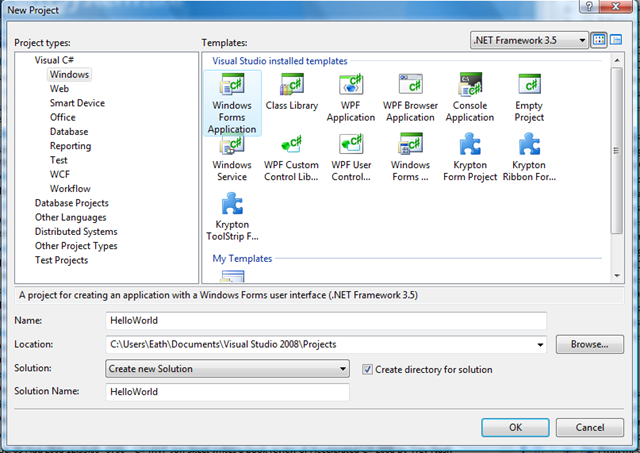
Nevertheless, create a new project (we’ll create a simple “hello world” application)

HelloWorld1

Drag a button onto a form, click the button to create a simple event handler

using System.ComponentModel;
using System.Data;
using System.Drawing;
using System.Linq;
using System.Text;
using System.Windows.Forms;

namespace HelloWorld
{
    public partial class Form1 : Form
    {
        public Form1()
        {
            InitializeComponent();
        }

        private void button1_Click(object sender, EventArgs e)
        {
            MessageBox.Show("Hello World, this is the new client profile");
        }
    }
}

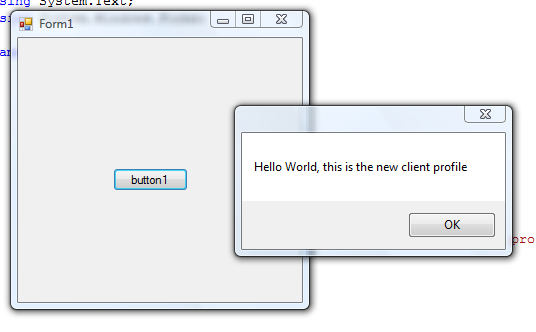
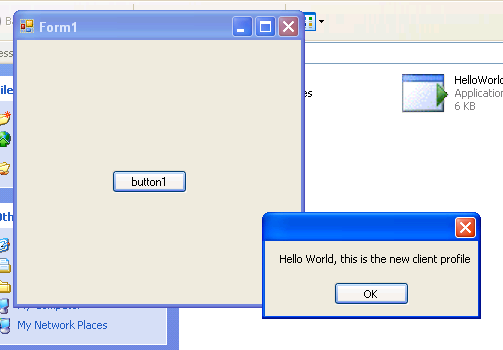
The following code as you might guess creates the following program

HelloWorldMessage

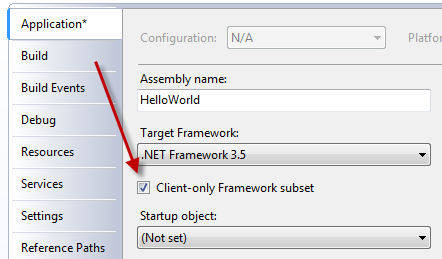
Double click the properties folder in Solution Explorer, select the application tab and check the client profile checkbox

HelloWorld2

Select the publish tab on the left and click on prerequisites

HelloWorld3

Here you should find the following options pre-selected, if not, select them

HelloWorld4

Now create a c:\deploy folder (at the top) and click “publish now” at the bottom

deploy

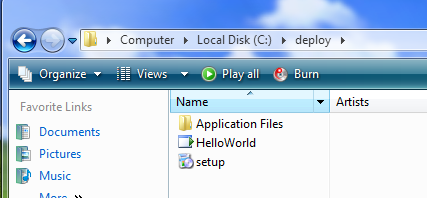
You should now have your files in a folder called deploy on your c:\ drive

deployFiles

I have a test XP machine that I have copied the files to, and clicked setup.exe to install the program. You should see a dialogue to install the client profile

SetupOfPRofile

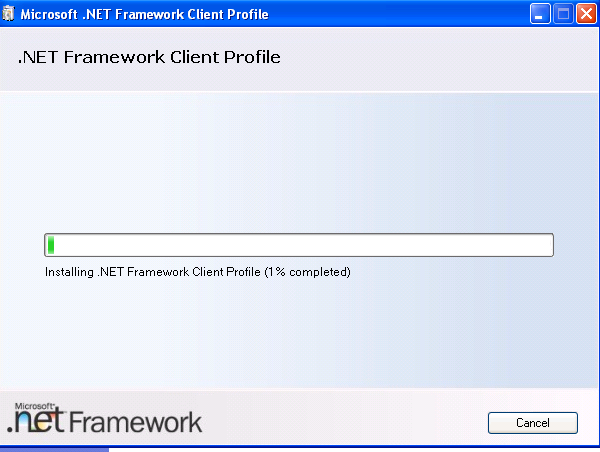
After accepting the license agreement, the client framework is installed

Installing

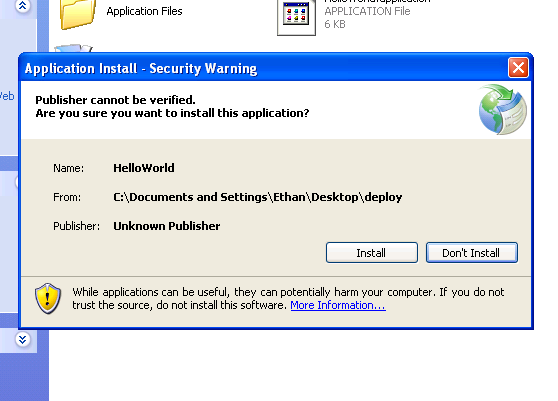
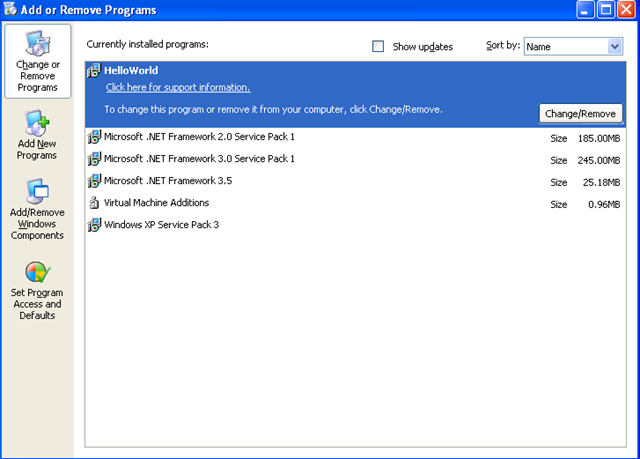
Once this has completed, you should be prompted to install the HelloWorld program

InstallProgram

You can then test the application to see that it works

Actual Program

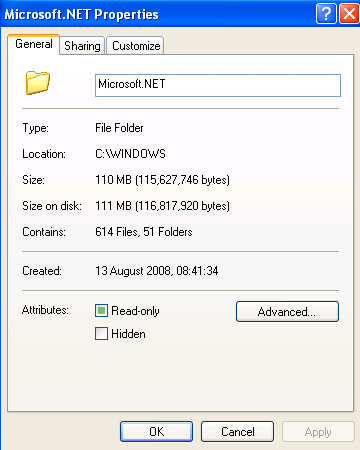
So why go through the bother of doing this? If you click into the windows folder on the XP machine and right click the .NET framework folder you can review its size which is approximately 53 MB in size.

I have another test XP test machine (for comparison) that also just has XP service pack 3. I have selected to install the full .NET framework 3.5 using the bootstrapper

DotNetAgain

Here the download size is 60 MB but look what it installs

DotNetThreePointFive

What you get is 455MB of framework code, but beware! Size information in XP is misleading. If you look at the .NET framework folder in c:\windows, you soon see that the actual size is around 110MB

FullDotNet

If I look at the .NET framework folder in Vista the size is 129MB (and this is .NET 3.5 SP1)

VistaDotNet

I know code does get installed in other places but as you can see the code you need to install is at least halved with the client profile.

New SQL Server 2008 Data Types


SQL Server 2008 includes 7 new data types. Presently, I’m embroiled in a Business Intelligence application that makes heavy use of Date and Time values. SQL Server 2005 is quite inflexible in this regard, because it was released after .NET 2.0 and failed to include the new Date and Time features. These new data types also resolve issues pertaining to the global nature of applications over the Internet. In layman’s terms, Microsoft in particular are investing heavily in Software as a Service (SaaS). If your application will be exposed over the Internet, with Rich Internet Application (RIA) frameworks like Microsoft Silverlight, then new features like this become necessities, especially across time zones.

Luckily this has now been addressed, and we have fields that offer far greater precision – essential for BI – and a separation of concerns. I have trawled through the Internet trying to find information, but most articles hitherto appear derived from this comprehensive technet article.